The Short Answer
Azure Site Recovery (ASR) is Microsoft's disaster recovery service that replicates your on-premises servers and virtual machines to Azure, enabling automated failover and recovery with recovery time objectives (RTO) under 2 hours and recovery point objectives (RPO) as low as 30 seconds. For UK businesses still relying on tape backups or manual disaster recovery procedures, ASR transforms disaster recovery from a slow, risky, manual process into an automated, tested, reliable operation. Typical implementation costs £3,000–£15,000 depending on environment size, with ongoing Azure consumption costs of £200–£1,000 per month for a typical SME. Every business running on-premises servers should implement ASR before disaster strikes — because the cost of implementing it after a disaster is measured in days of downtime, not pounds.
Disaster recovery is the insurance policy every business hopes never to use — but when you need it, nothing else matters. Traditional disaster recovery — tape backups, cold sites, manual restoration — is slow, untested, and often fails when you need it most. Azure Site Recovery changes the game by providing automated, continuously tested disaster recovery that works every time.
What Is Azure Site Recovery?
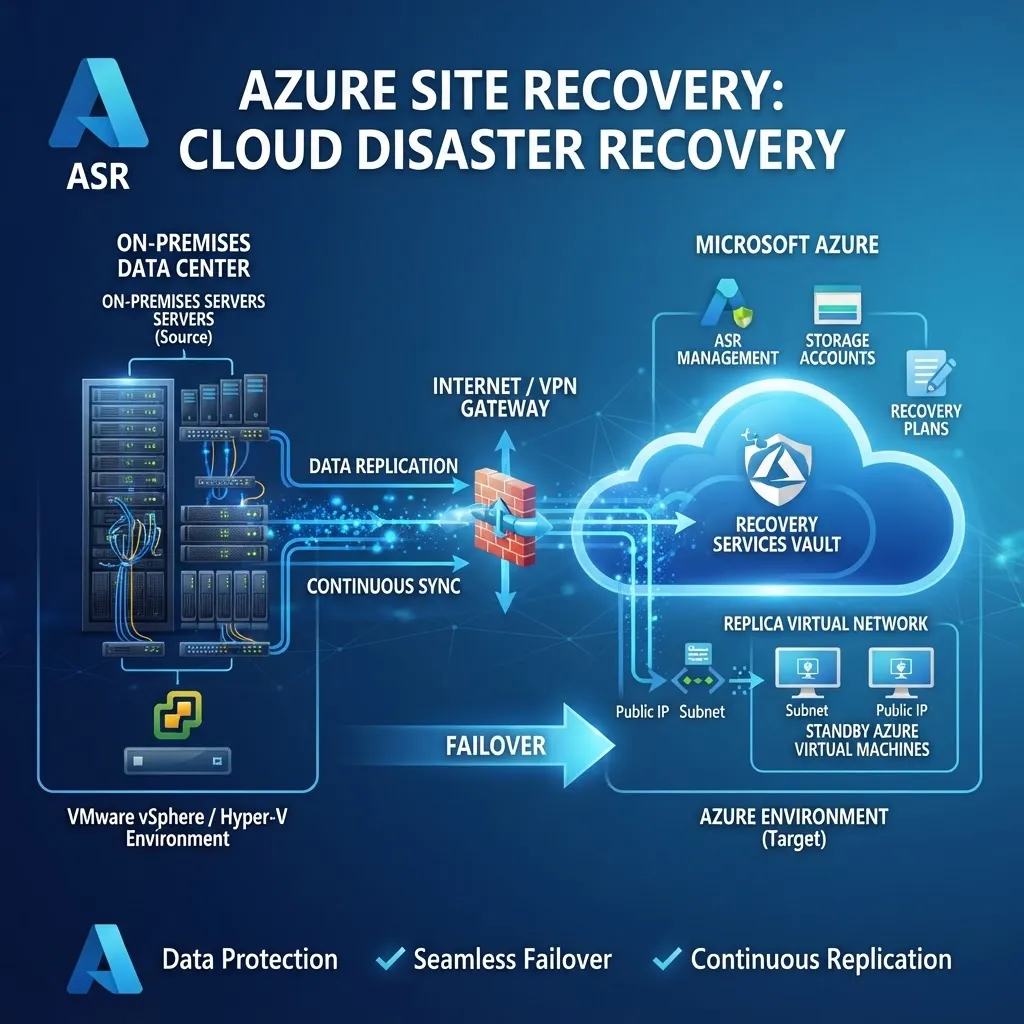
Azure Site Recovery is a cloud-based disaster recovery service that replicates your workloads from a primary site (your on-premises data centre or office) to a secondary site (Azure or another on-premises location). When a disaster occurs, ASR orchestrates automated failover — spinning up your replicated VMs in Azure with minimal downtime, then failing back to your primary site when the disaster is resolved.
Key capabilities:
- Continuous replication — Replicate VMs and physical servers to Azure with RPO as low as 30 seconds, meaning you lose at most 30 seconds of data in a disaster.
- Automated failover — One-click or fully automated failover to Azure with pre-configured recovery plans that start VMs in the correct order.
- Recovery plans — Define the exact sequence of VM startup, scripts to run, and manual actions required — ensuring a predictable, repeatable recovery.
- Non-disruptive testing — Test your disaster recovery without impacting production workloads. ASR creates a copy of your replicated environment in an isolated Azure virtual network, runs your recovery plan, and tears it down — all without any downtime.
- Failback — Once your primary site is restored, fail back from Azure to on-premises with delta sync, ensuring no data is lost during the return.
Why Traditional Disaster Recovery Fails
Most UK SMEs rely on one of three disaster recovery approaches — and all three have serious limitations:
1. Tape Backup
Tape backup is the traditional approach: back up data to tape, store tapes offsite, and restore from tape when needed. The problems are significant:
- Slow recovery — Restoring a server from tape takes 8–24 hours. For a business losing £4,000+ per hour of downtime, that's £32,000–£96,000 in losses before recovery is complete.
- Untested recovery — Most businesses never test tape restoration. When they do, 30–40% discover their backups are corrupted, incomplete, or incompatible with their recovery hardware.
- No full-server recovery — Tape backs up data, not the entire server. You need to rebuild the operating system, reinstall applications, configure settings, then restore data — adding days to recovery time.
- Physical media risk — Tapes degrade, get lost, or are damaged. A tape that's been sitting in a fire safe for 3 years may not restore when you need it.
2. External Hard Drive Backup
Backing up to external hard drives and taking them offsite is common for small businesses, but it has the same limitations as tape — slow recovery, untested restoration, and no full-server recovery. Plus, hard drives are fragile and can fail without warning.
3. Cold Site Recovery
A cold site is a secondary data centre with power and cooling but no active equipment. In a disaster, you ship hardware to the cold site, install it, configure it, and restore data. Recovery time: 3–7 days. Cost: £50,000–£200,000 in hardware and setup. For most SMEs, this is prohibitively expensive and far too slow.
How Azure Site Recovery Works
ASR works by installing a lightweight agent on your on-premises servers (or integrating with VMware/Hyper-V hypervisors) that continuously replicates data to Azure.
The replication process:
- Initial replication — ASR copies your entire VM to Azure. For a 500GB server on a 100Mbps connection, this takes about 12 hours. You can also use Azure Data Box to ship the initial copy physically for very large environments.
- Delta replication — After initial replication, ASR only sends changes to Azure — typically a few megabytes per minute for a busy server. This keeps bandwidth usage low and RPO minimal.
- Recovery points — ASR stores multiple recovery points — you can configure it to keep crash-consistent recovery points every 5 minutes and app-consistent recovery points every 15–60 minutes.
- Failover — When a disaster occurs, you trigger failover. ASR creates Azure VMs from your replicated data, starts them in the order defined by your recovery plan, and your business is operational in Azure within minutes to hours.
Recovery Time and Recovery Point Objectives
The two metrics that define disaster recovery performance are:
- Recovery Time Objective (RTO) — How long it takes to recover and resume operations. With ASR, RTO is typically 30 minutes to 2 hours, depending on VM startup time and recovery plan complexity.
- Recovery Point Objective (RPO) — How much data you can afford to lose. With ASR's continuous replication, RPO is as low as 30 seconds — you lose at most 30 seconds of data in a disaster.
Compare this to traditional approaches:
| Method | RTO | RPO | Tested? | |--------|-----|-----|---------| | Tape backup | 8–24 hours | 24 hours | Rarely | | External drive | 4–12 hours | 24 hours | Rarely | | Cold site | 3–7 days | 24 hours | Never | | Azure Site Recovery | 30 min – 2 hours | 30 seconds | Monthly |
The Cost of Azure Site Recovery
ASR pricing has two components:
1. ASR service cost:
- £18 per protected VM per month (for VMs replicating to Azure)
- This covers the replication engine, recovery plan orchestration, and non-disruptive testing
2. Azure consumption during failover:
- You only pay for Azure compute and storage when you actually fail over and run VMs in Azure
- During normal operation (replication only), you pay only for the storage used by replicated data — approximately £0.12 per GB per month
- A 500GB VM costs about £60/month in storage during replication
Total cost for a typical 10-server SME:
- ASR service: £180/month (10 VMs × £18)
- Replication storage: £600/month (10 VMs × 500GB × £0.12/GB)
- Total: £780/month — less than the cost of a single day of downtime for most businesses
Non-Disruptive Disaster Recovery Testing
The single biggest advantage of ASR over traditional disaster recovery is the ability to test your recovery without any disruption to production.
How test failover works:
- You select a recovery point and trigger a test failover in the Azure portal.
- ASR creates copies of your replicated VMs in an isolated Azure virtual network.
- Your recovery plan runs — starting VMs in order, running scripts, and applying configurations.
- You verify that your applications work correctly in the Azure environment.
- You tear down the test environment — and your production workloads are completely unaffected.
This means you can test your disaster recovery monthly, quarterly, or whenever you want — with zero downtime. And because you're testing in the actual Azure environment where you'd recover in a real disaster, you know your recovery will work when you need it.
Why this matters: 60% of businesses that test their disaster recovery discover it doesn't work. With ASR's non-disruptive testing, you discover and fix issues during a test — not during a real disaster.
Implementing Azure Site Recovery: A Phased Approach
Phase 1: Assessment and Planning (Week 1)
- Inventory all servers and VMs that need protection
- Map dependencies between servers (which servers need to start before others)
- Define RTO and RPO requirements for each workload
- Design the Azure target architecture (virtual network, subnets, security groups)
- Create recovery plans defining startup order and scripts
Phase 2: Initial Replication (Week 2–3)
- Install the ASR Mobility Service agent on each protected server
- Configure replication settings (RPO, retention period, recovery point frequency)
- Start initial replication — this runs in the background without impacting production
- Monitor replication health and resolve any issues
Phase 3: Recovery Plan Configuration (Week 3)
- Create recovery plans that define the exact sequence of VM startup
- Add automation scripts (e.g., updating DNS records, starting application services)
- Configure network mappings so VMs connect to the correct Azure virtual network on failover
- Define failover and failback procedures
Phase 4: Testing and Validation (Week 4)
- Run a test failover for each recovery plan
- Verify that applications start correctly and are accessible
- Test network connectivity and performance
- Document the recovery procedure and train your team
- Schedule regular (monthly or quarterly) test failovers
Common Use Cases for Azure Site Recovery
On-Premises to Azure DR
The most common use case: replicate on-premises VMware or Hyper-V VMs to Azure for disaster recovery. If your office or data centre becomes unavailable, fail over to Azure and continue operating from the cloud.
Azure Region to Azure Region DR
For businesses already running in Azure, ASR can replicate between Azure regions (e.g., UK South to UK West) for regional disaster recovery. This protects against Azure regional outages.
Migration to Azure
ASR isn't just for disaster recovery — it's also a migration tool. You can use ASR to migrate on-premises VMs to Azure permanently by performing a planned failover and then decommissioning the on-premises servers.
Frequently Asked Questions
How much does Azure Site Recovery cost per month?
ASR costs £18 per protected VM per month for the replication service, plus Azure storage costs for replicated data (approximately £0.12 per GB per month). A typical 10-server SME with 500GB per server pays approximately £780/month total. You only pay for Azure compute when you actually fail over and run VMs in Azure.
How long does it take to recover with Azure Site Recovery?
Recovery time (RTO) with ASR is typically 30 minutes to 2 hours, depending on the number of VMs, their size, and the complexity of your recovery plan. This compares to 8–24 hours for tape backup recovery and 3–7 days for cold site recovery.
How much data do I lose in a disaster with Azure Site Recovery?
With ASR's continuous replication, your recovery point objective (RPO) is as low as 30 seconds — meaning you lose at most 30 seconds of data in a disaster. You can configure recovery point frequency and retention to match your business requirements.
Can I test my disaster recovery without downtime?
Yes. Azure Site Recovery's test failover feature creates a copy of your replicated environment in an isolated Azure virtual network, runs your recovery plan, and tears it down — all without any impact on your production workloads. This enables monthly or quarterly disaster recovery testing with zero downtime.
Does Azure Site Recovery work with VMware?
Yes. ASR integrates with VMware vSphere and Hyper-V hypervisors, as well as physical servers. For VMware, ASR uses a configuration server and process servers to orchestrate replication. For Hyper-V, ASR integrates directly with the hypervisor.
What happens to my data after failover?
After failover, your VMs run in Azure and your data is stored in Azure storage. When your primary site is restored, you perform a failback — ASR delta-syncs any changes made in Azure back to your on-premises servers, ensuring no data is lost during the return.
Is Azure Site Recovery compliant with UK data residency requirements?
Yes. ASR can replicate to Azure UK South and UK West regions, ensuring your replicated data stays within the UK. This meets UK data residency requirements for most regulated industries, including financial services, healthcare, and government contractors.
Can I automate failover with Azure Site Recovery?
Yes. ASR supports automated failover using Azure Automation runbooks and recovery plan scripts. You can configure ASR to automatically fail over when specific conditions are detected (e.g., a monitoring alert indicating primary site failure), reducing recovery time to minutes.